Three steps to a proposal
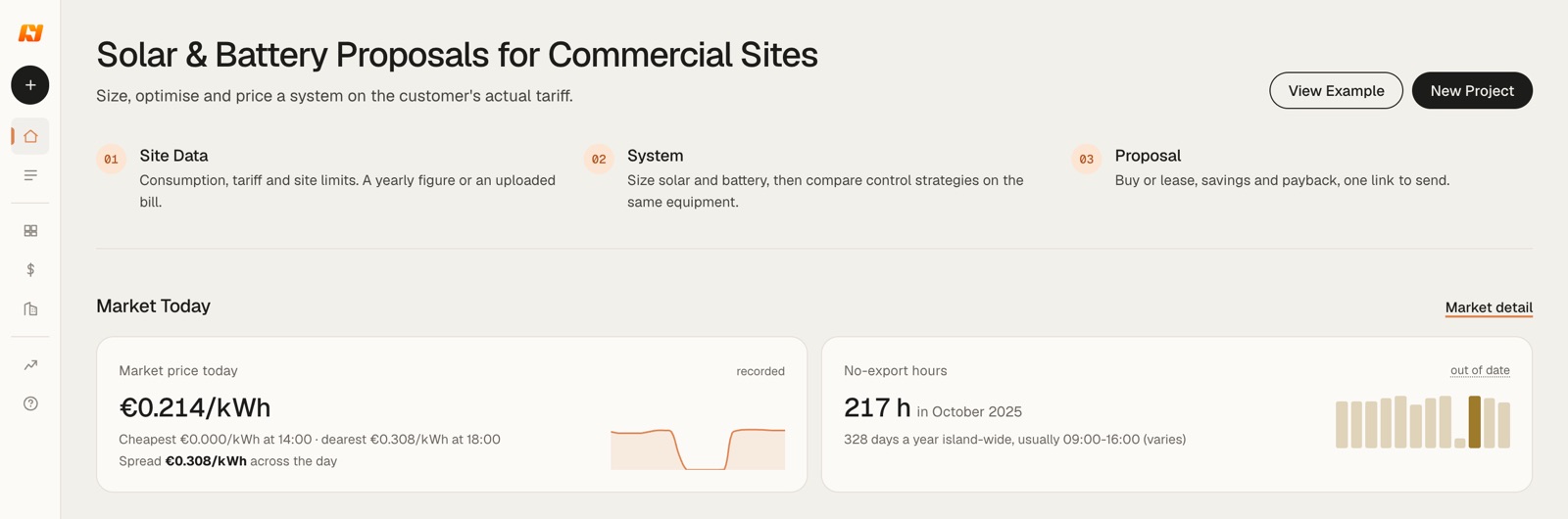
Home shows the whole job in three steps. Site data: consumption, tariff and site limits, typed in as a yearly figure or read from an uploaded bill. System: size solar and battery, then compare two ways of running the same equipment. Proposal: buy or lease, savings and payback, one link to send.
Under the steps, Market Today shows today's Cyprus market price and this month's no-export hours. Both feed every plan.
Getting around
- +
- New project.
- Home
- The three steps and Market Today.
- Projects
- Your saved plans. They live under your account, so sign in or create one when you start your first project.
- Equipment
- The products you sell, at your cost and price, with a default for each kind.
- Pricing Defaults
- Your unit rates, running costs and finance terms. New projects start from them.
- Company
- Your company's settings.
- Market
- Cyprus day-ahead prices and no-export hours.
- How it works
- The full method behind the numbers.
Enter the site data
Start with Upload a bill or enter site data manually. A PDF or a photo of the bill fills the fields for you; check what it read before you go on. Four fields drive the plan:
- Annual Consumption
- kWh a year. One yearly figure is shaped hour by hour with a Cyprus profile for the business type. Twelve monthly readings replace that shape with the site's own.
- Current Tariff
- What the customer pays today, for example EAC Code 30. The bill today is priced on it.
- Grid Connection
- kVA from the bill. It caps import and export and decides which tariffs the site can sign.
- Operating Season
- Open all year, or seasonal.
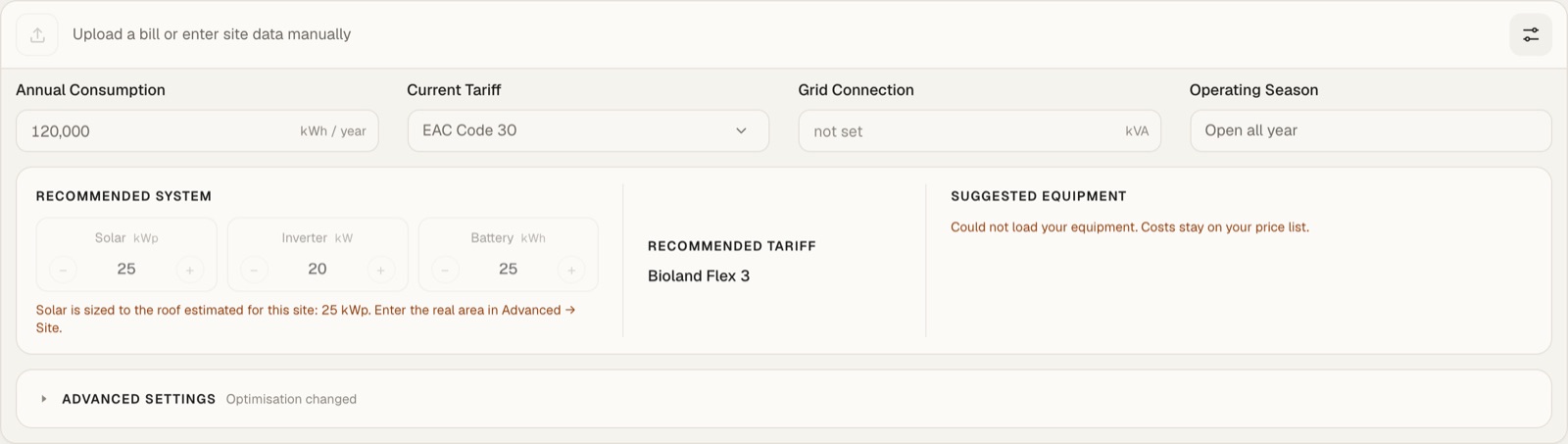
Grid connection not entered. The plan still runs on consumption alone, and a yellow banner says so. Tariff eligibility and the grid limit check are confirmed once you enter the kVA from the bill and recalculate.
Check the recommended system
Recommended System shows solar in kWp, inverter in kW and battery in kWh. Use − and + to try another size; the plan recalculates. Every quote carries a battery, and the best solar-only size is reported beside it for reference.
A line in orange names whatever capped the size. In the example, solar is held to the roof the tool estimated for the site, 25 kWp. Enter the real roof area under Advanced → Site and the cap moves.
Recommended Tariff is the tariff the system is priced on. Suggested Equipment picks panels, inverter and battery from your Equipment library; without a library, costs stay on your price list.
Advanced settings
Open Advanced Settings under the system. Four tabs; a dot on a tab means something in it differs from your defaults.
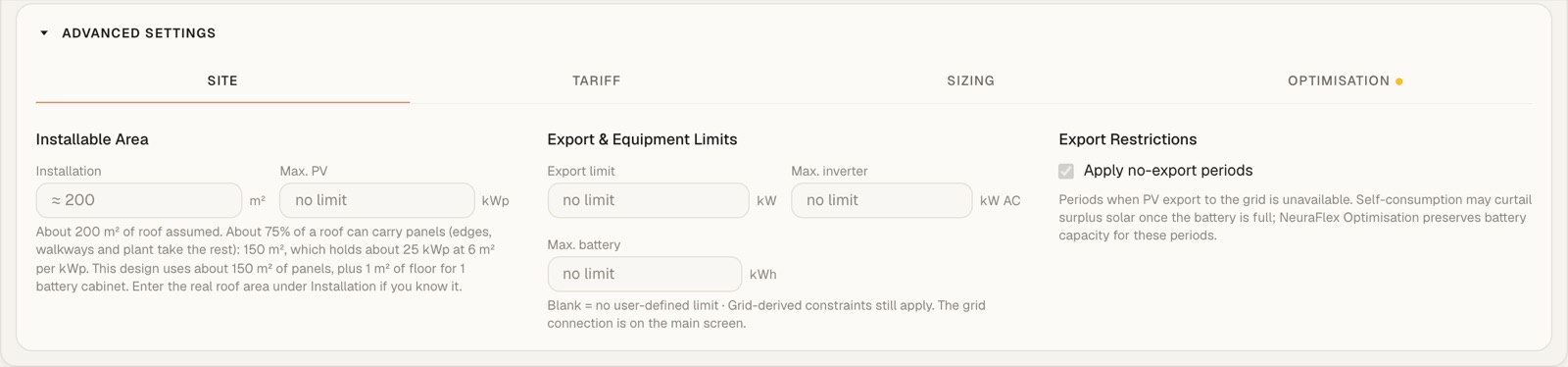
Site
Installable area and maximum PV; export limit, maximum inverter and maximum battery; and Apply no-export periods, the hours when the grid takes no solar. Blank means no limit of your own, and limits from the grid connection still apply.
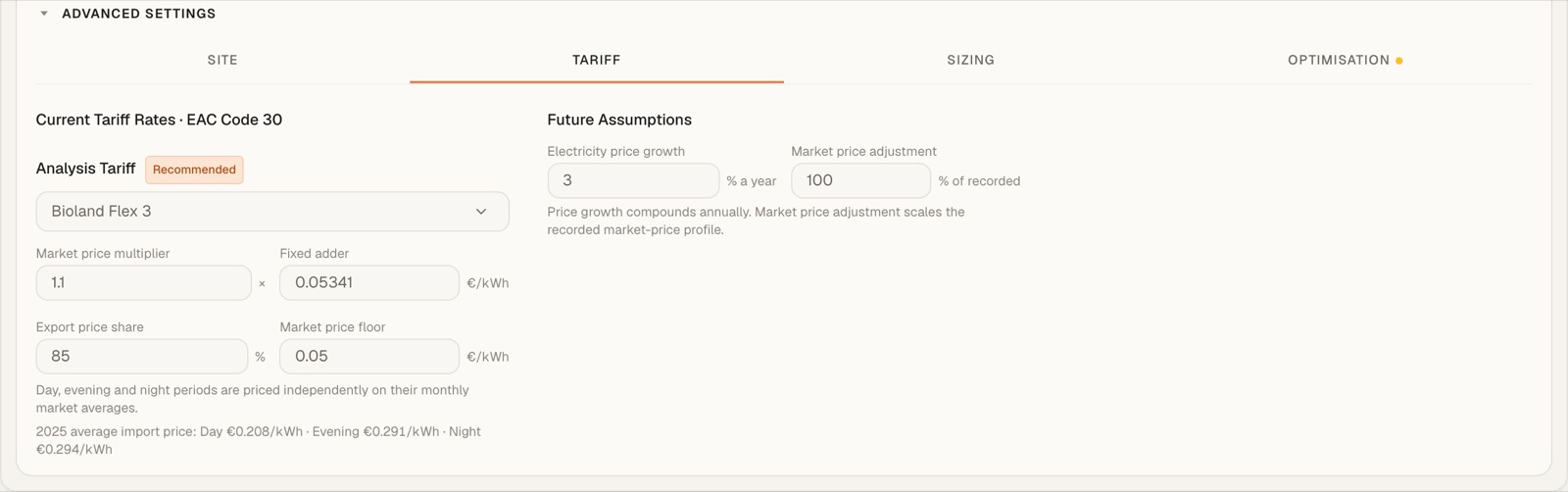
Tariff
The analysis tariff and its rates. For Bioland tariffs that is the market price multiplier, fixed adder, export price share and market price floor. On the right, future assumptions: electricity price growth a year and a market price adjustment against recorded prices.
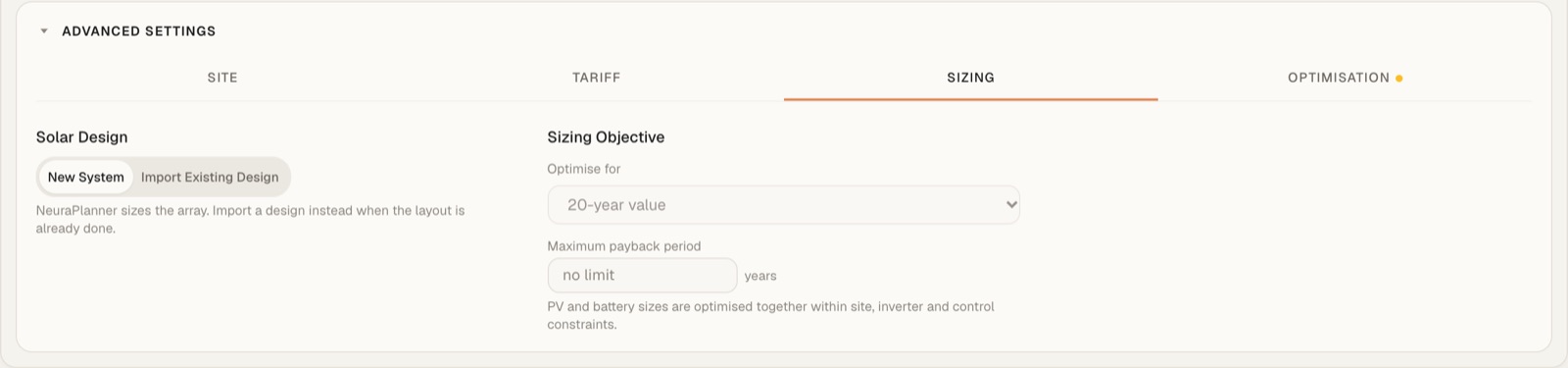
Sizing
New System lets NeuraPlanner size the array; Import Existing Design works from a layout you already have. Optimise for sets the goal, 20-year value by default, with an optional maximum payback period. Solar and battery are sized together inside the site, inverter and control limits.
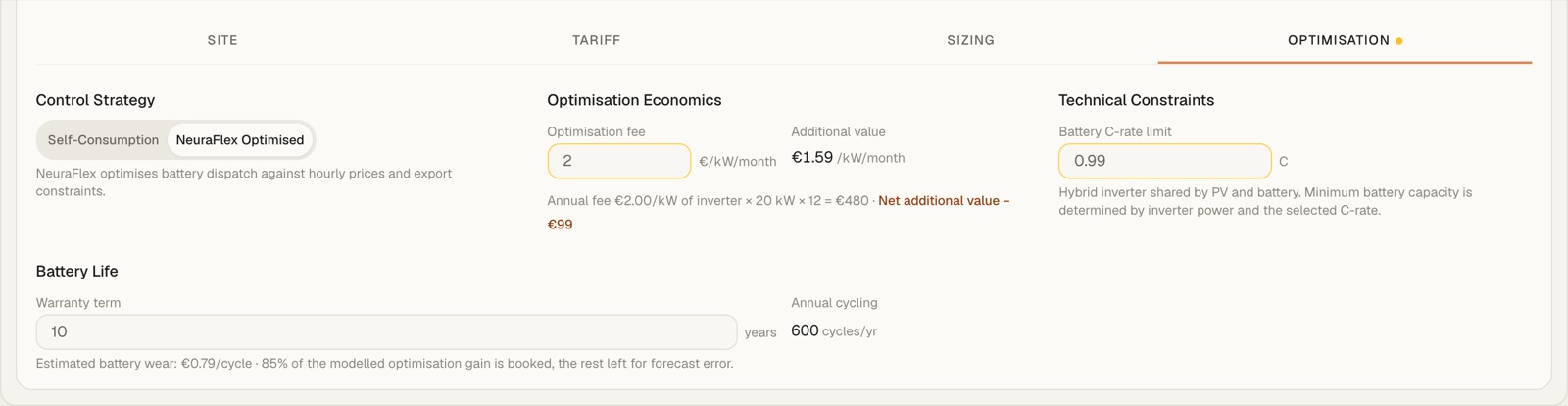
Optimisation
Control Strategy switches between Self-Consumption and NeuraFlex Optimised. Optimisation Economics compares the fee per kW of inverter a month with the extra value NeuraFlex earns, and shows the net. Battery C-rate, warranty term and annual cycling set how hard the battery may work.
Read the headline: buy or lease
The first card under the inputs is the answer the customer asks for. Switch between Buy and Lease.
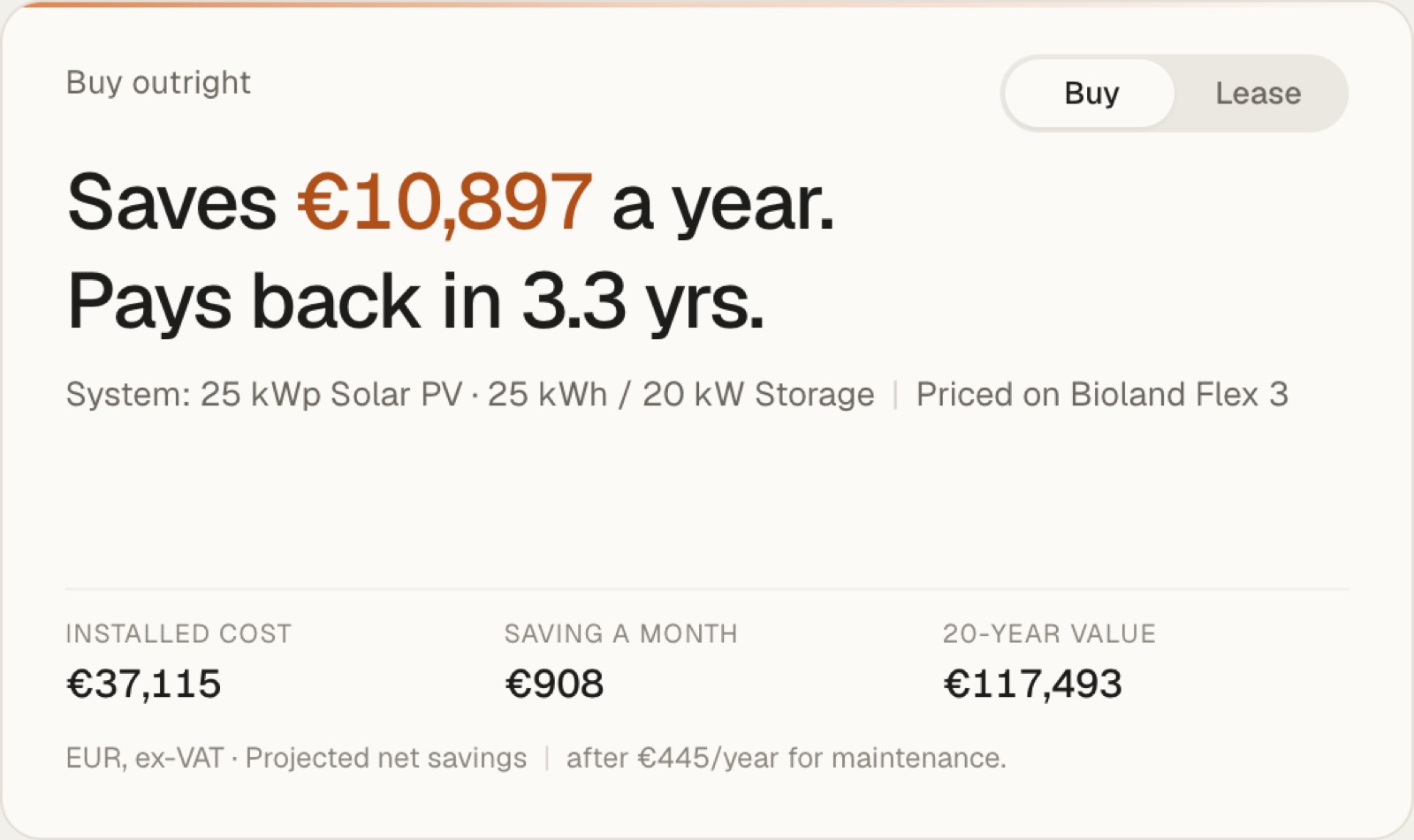
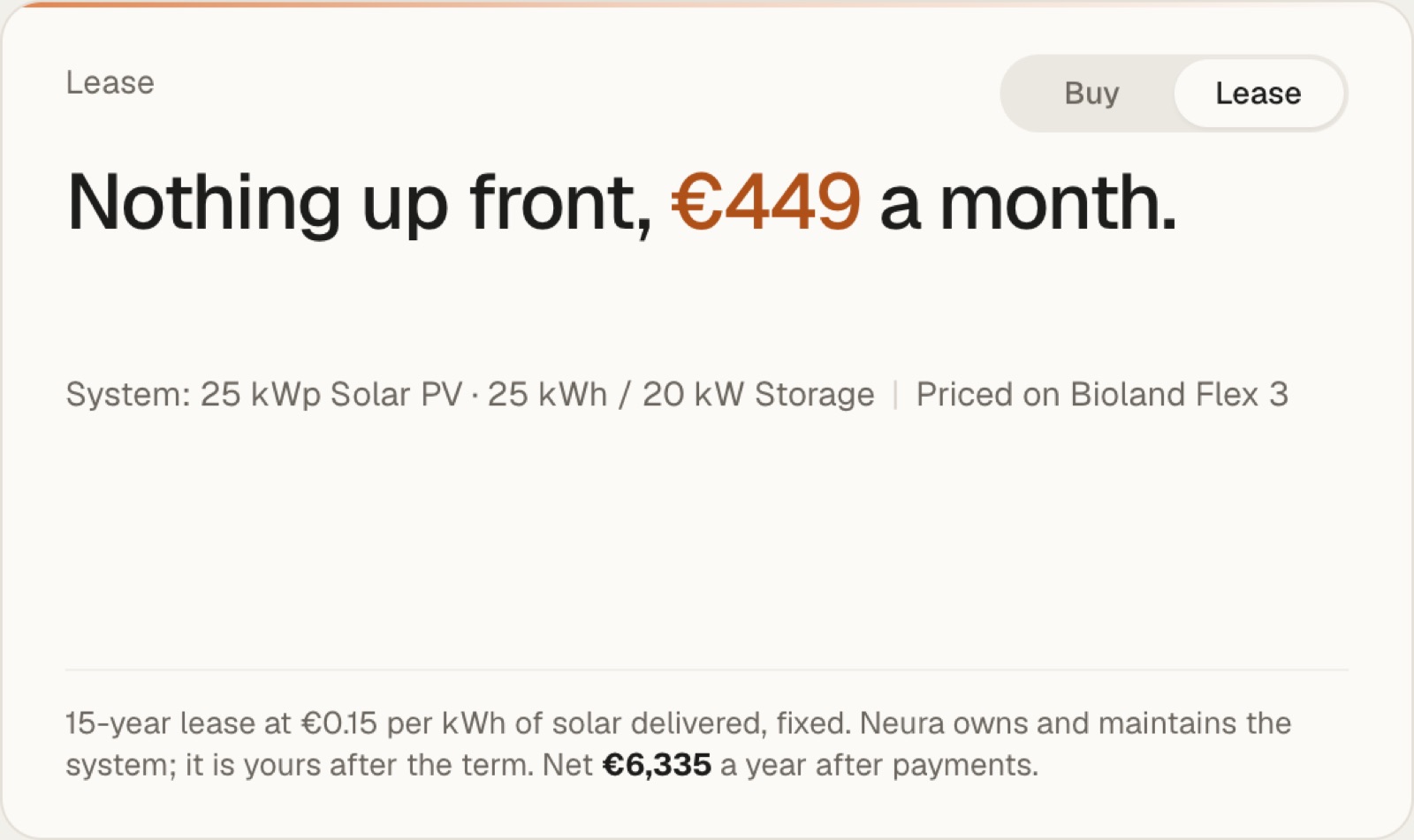
Where the bill goes
The estimated bill today, then what each change takes off it: the tariff switch, then solar and battery. Tick a step on or off to see its share. Detailed view breaks the bill into its parts.
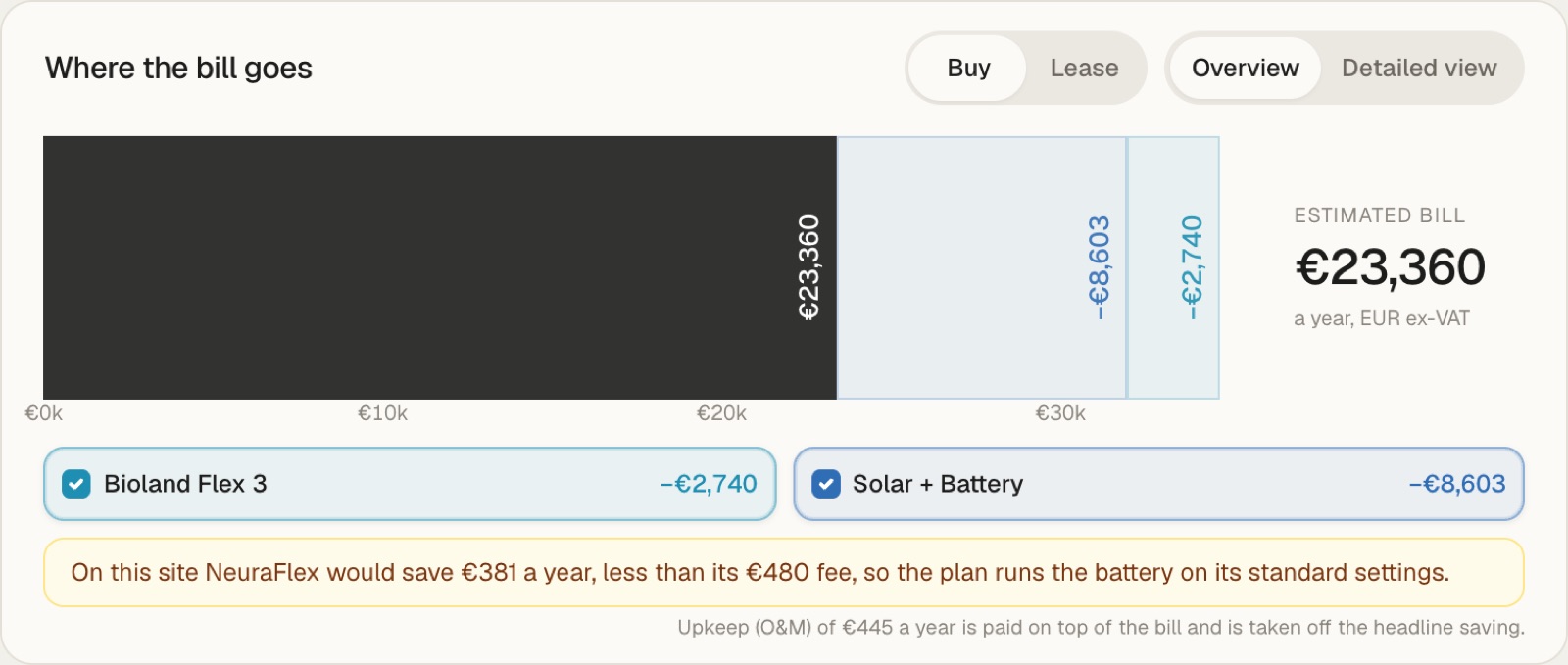
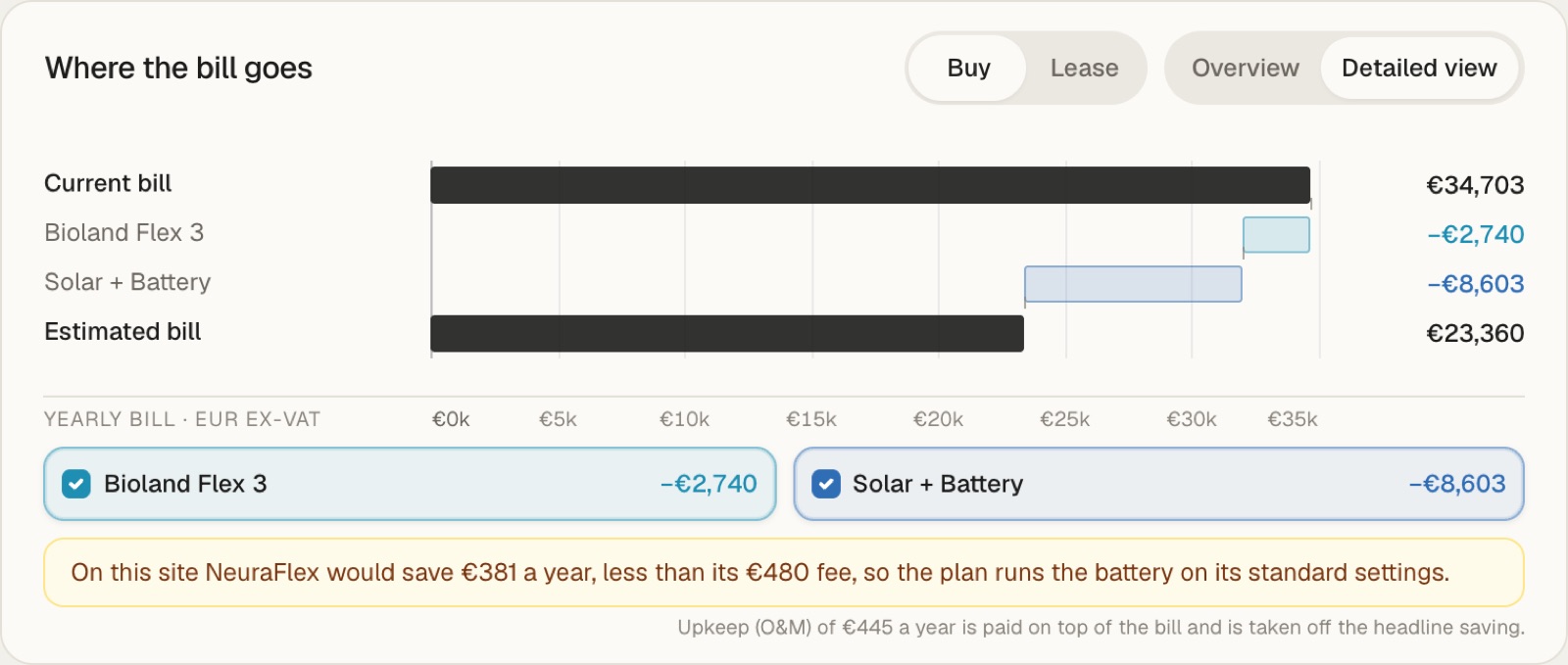
When NeuraFlex would earn less than its fee on a site, the card says so and the plan runs the battery on its standard settings. In the example NeuraFlex would save €381 a year against a €480 fee.
Site diagram
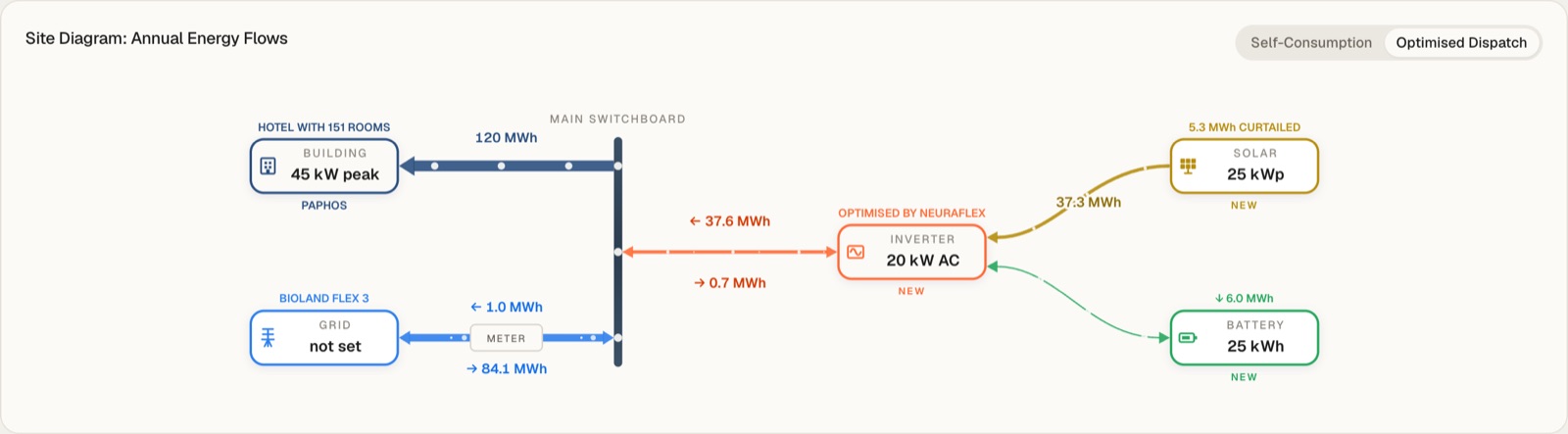
Annual energy flows in MWh between grid, building, inverter, solar and battery. New equipment is marked NEW, and curtailed solar is shown above the array. Switch between Self-Consumption and Optimised Dispatch to see how the flows change.
Daily energy flow
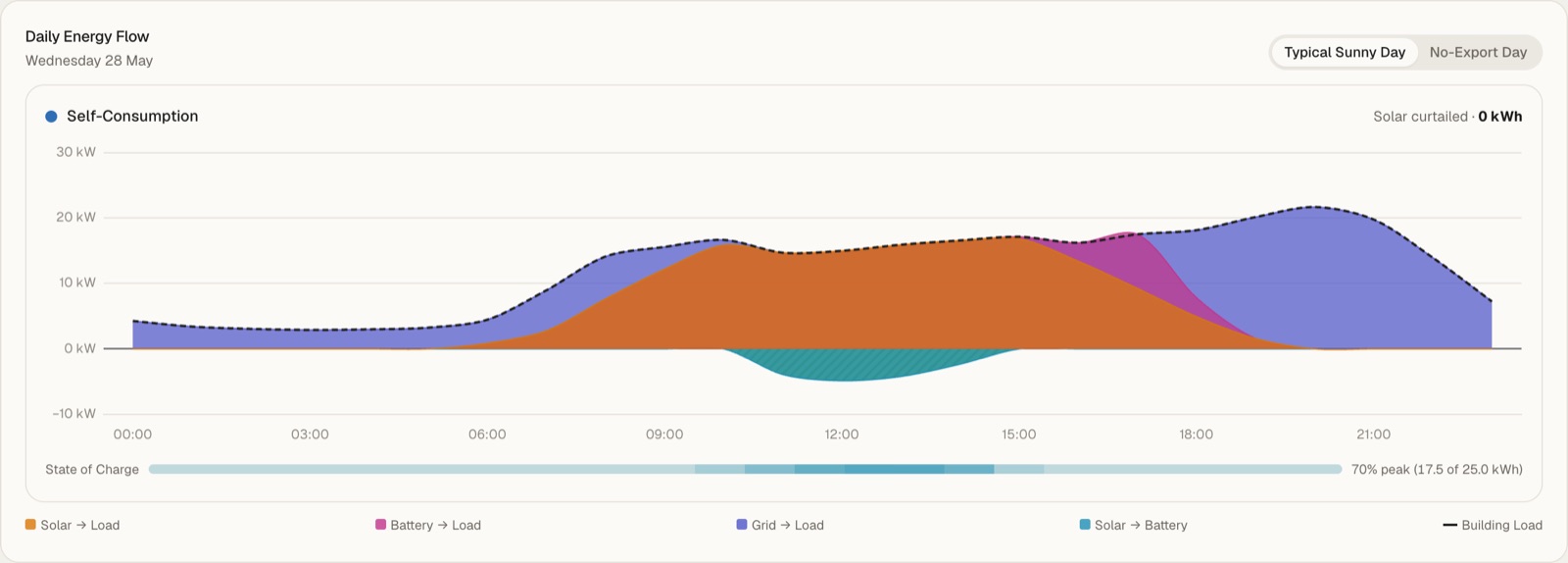
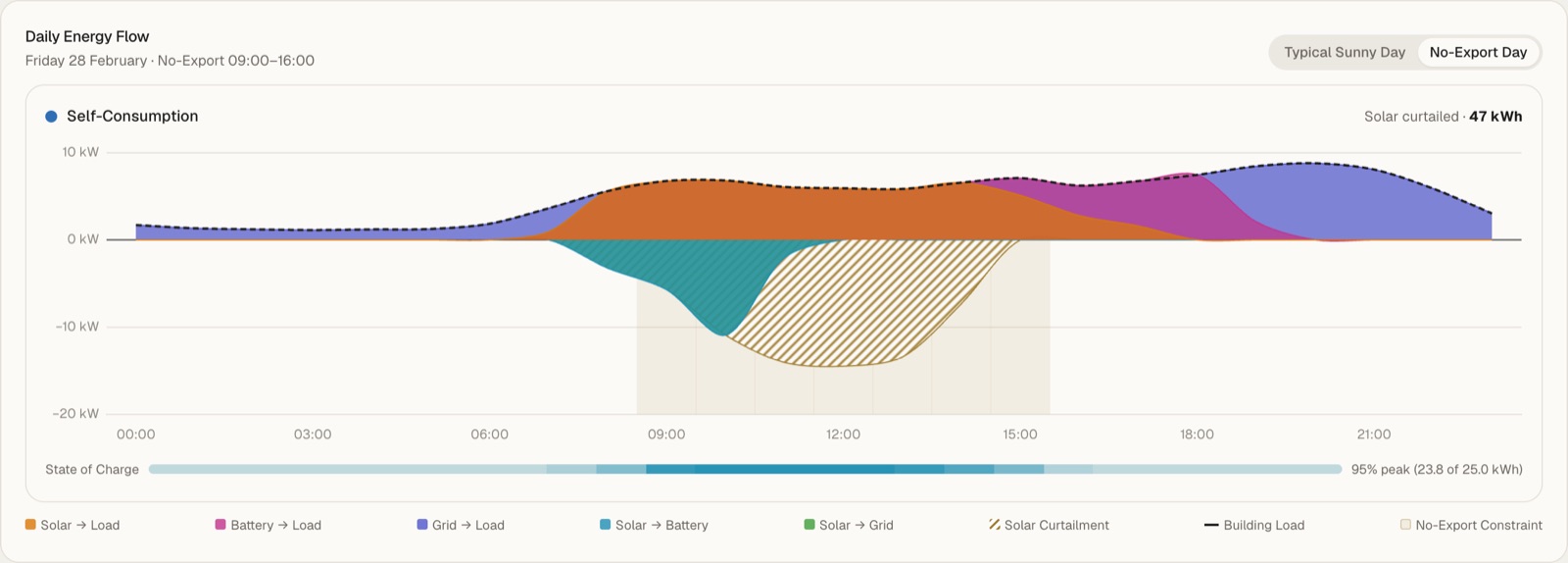
One day hour by hour: solar to load, battery to load, grid to load and solar to battery, with the building load as a dashed line. The bar under the chart is the battery's state of charge. Choose Typical Sunny Day or No-Export Day, when the grid takes no solar and curtailment shows up.
Over the year
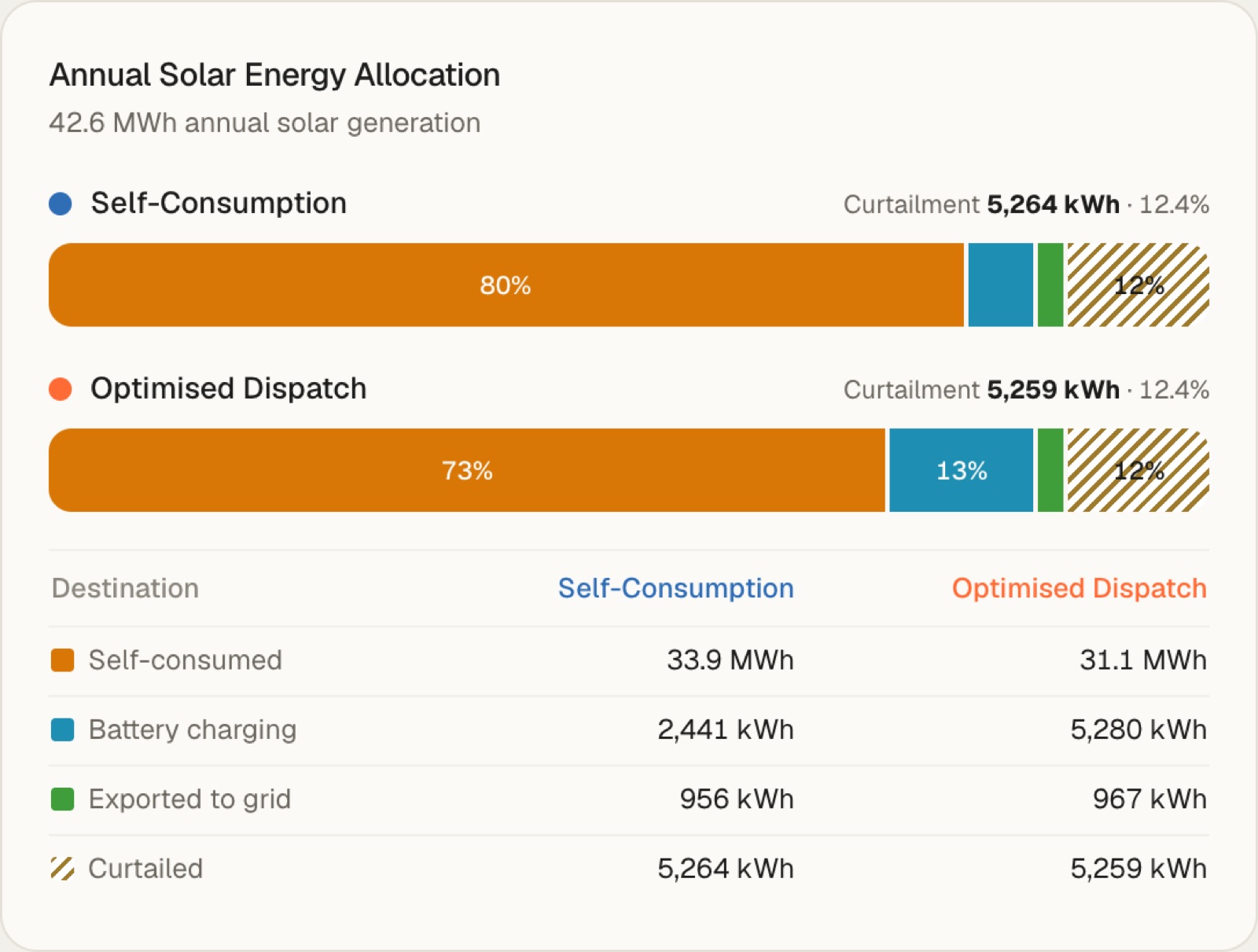
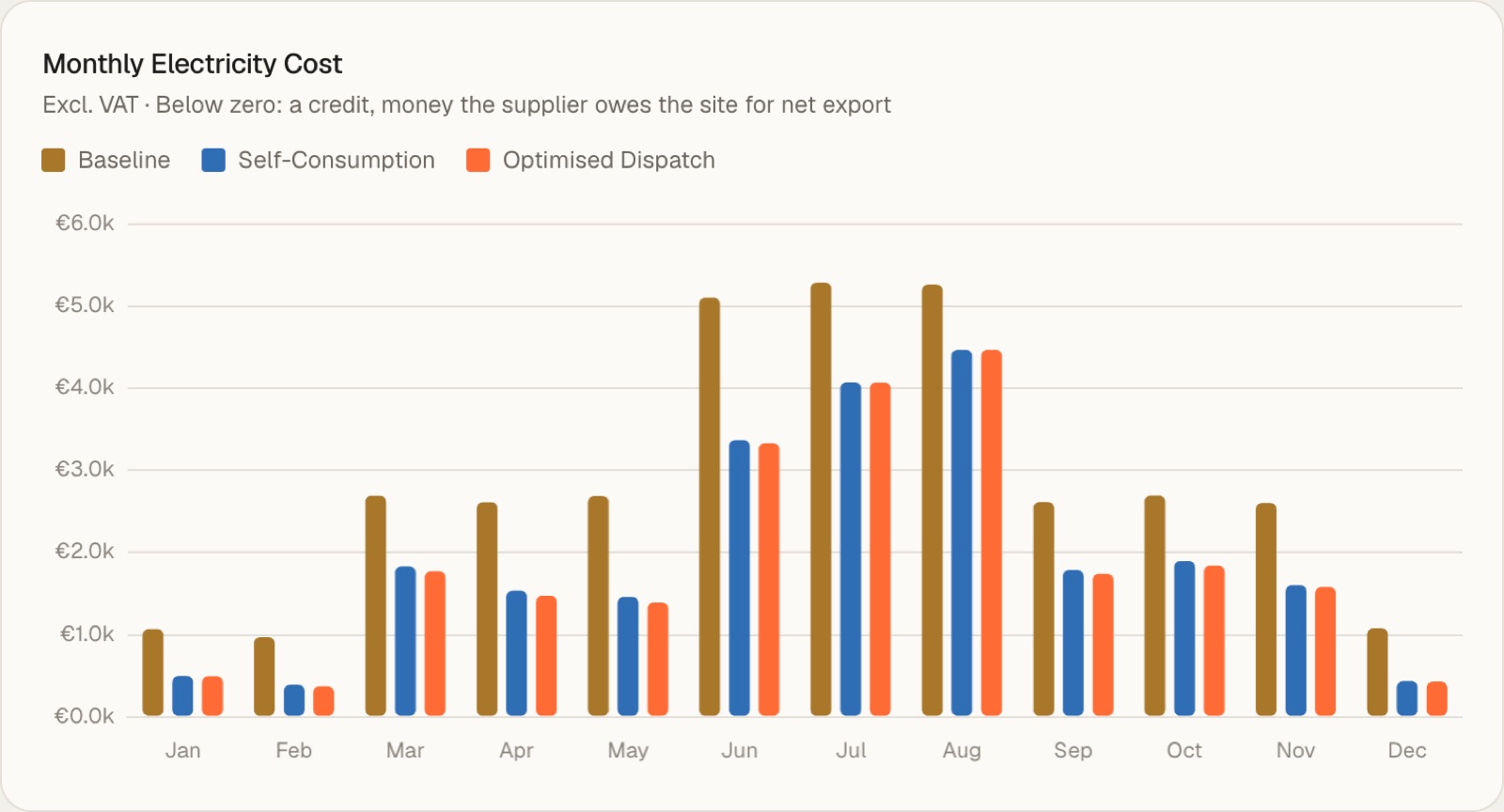
Annual Solar Energy Allocation splits the year's solar into self-consumed, battery charging, exported and curtailed, for both control strategies. Monthly Electricity Cost compares the bill month by month; below zero is a credit, money the supplier owes the site for net export.
Financial analysis
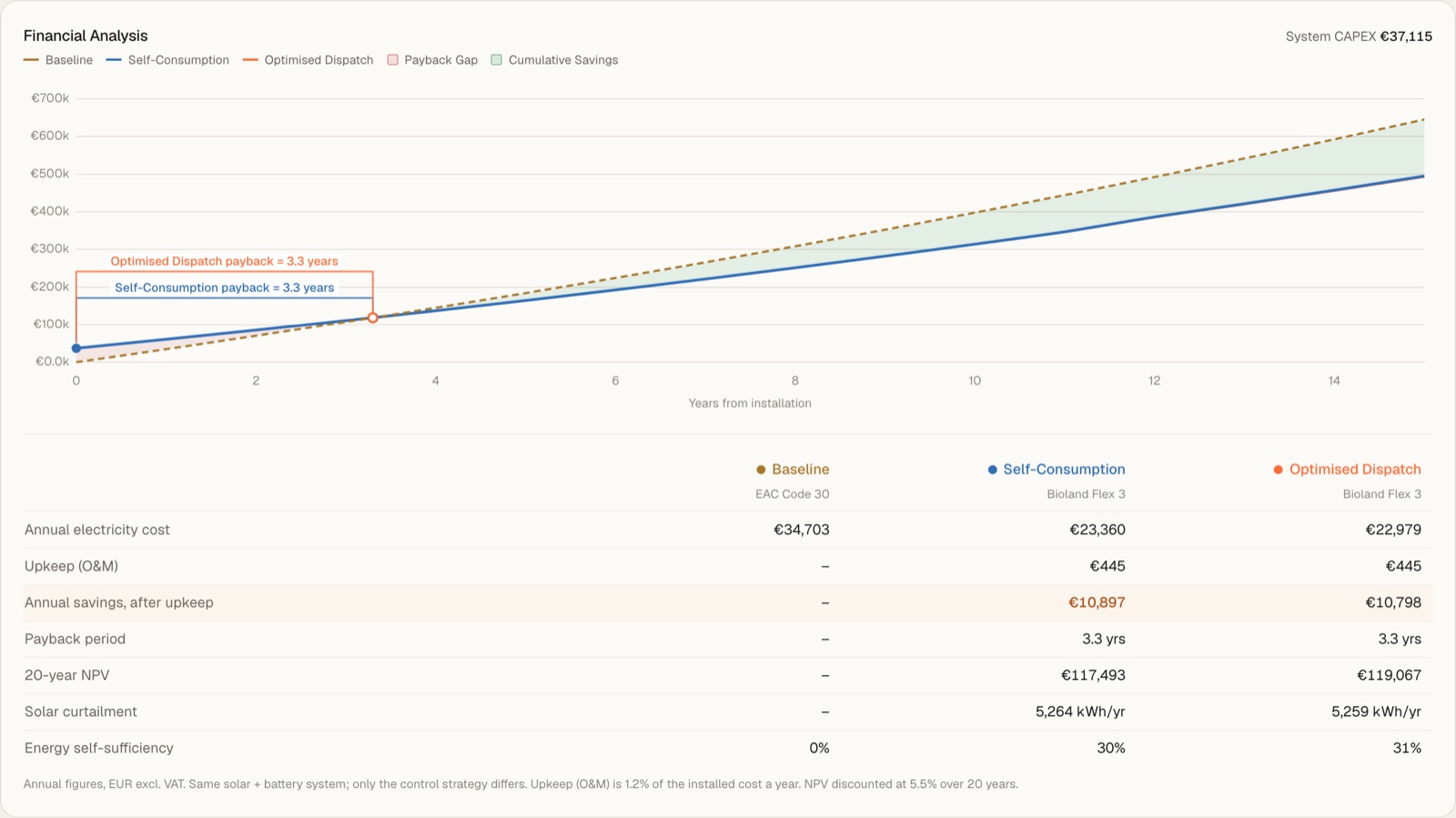
Cumulative cost over the years for the baseline, Self-Consumption and Optimised Dispatch, with the payback point marked for each. The table below gives annual cost, upkeep, savings after upkeep, payback, 20-year NPV, curtailment and self-sufficiency.
Tariff comparison
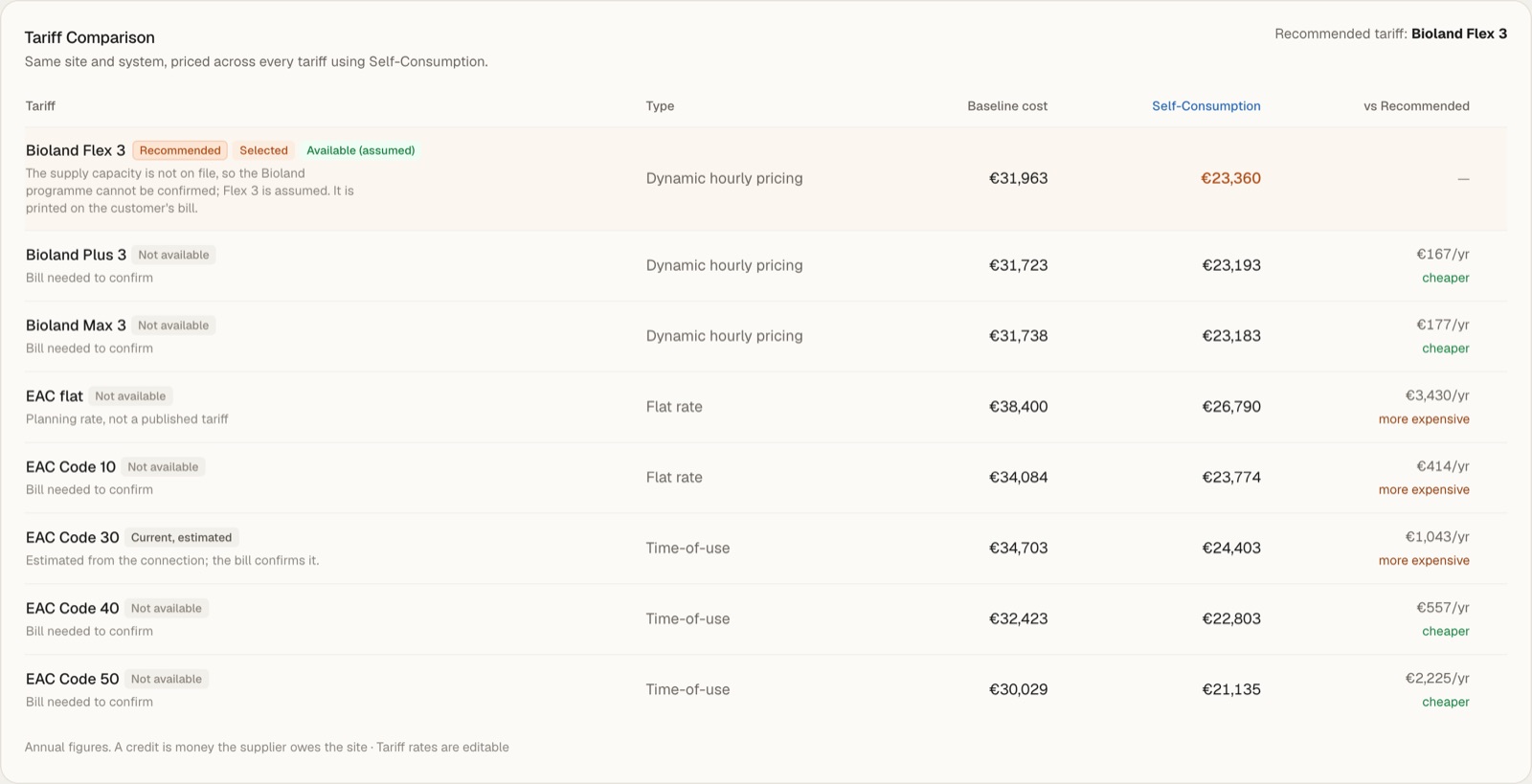
The same site and system priced on every Cyprus tariff, against the recommended one. Each row carries a status:
- Recommended
- The best tariff the site can sign.
- Selected
- The tariff the plan is priced on.
- Current, estimated
- What the customer is on today, estimated until the bill confirms it.
- Available (assumed)
- Likely available, but the supply capacity is not on file yet.
- Not available
- Usually "Bill needed to confirm". Enter the grid connection and recalculate.
Data and assumptions
What the plan stands on: months of recorded market prices, days and hours of no-export notices, average import price, average export credit, solar yield and annual consumption. View all assumptions lists every rate and default in use.

Market page
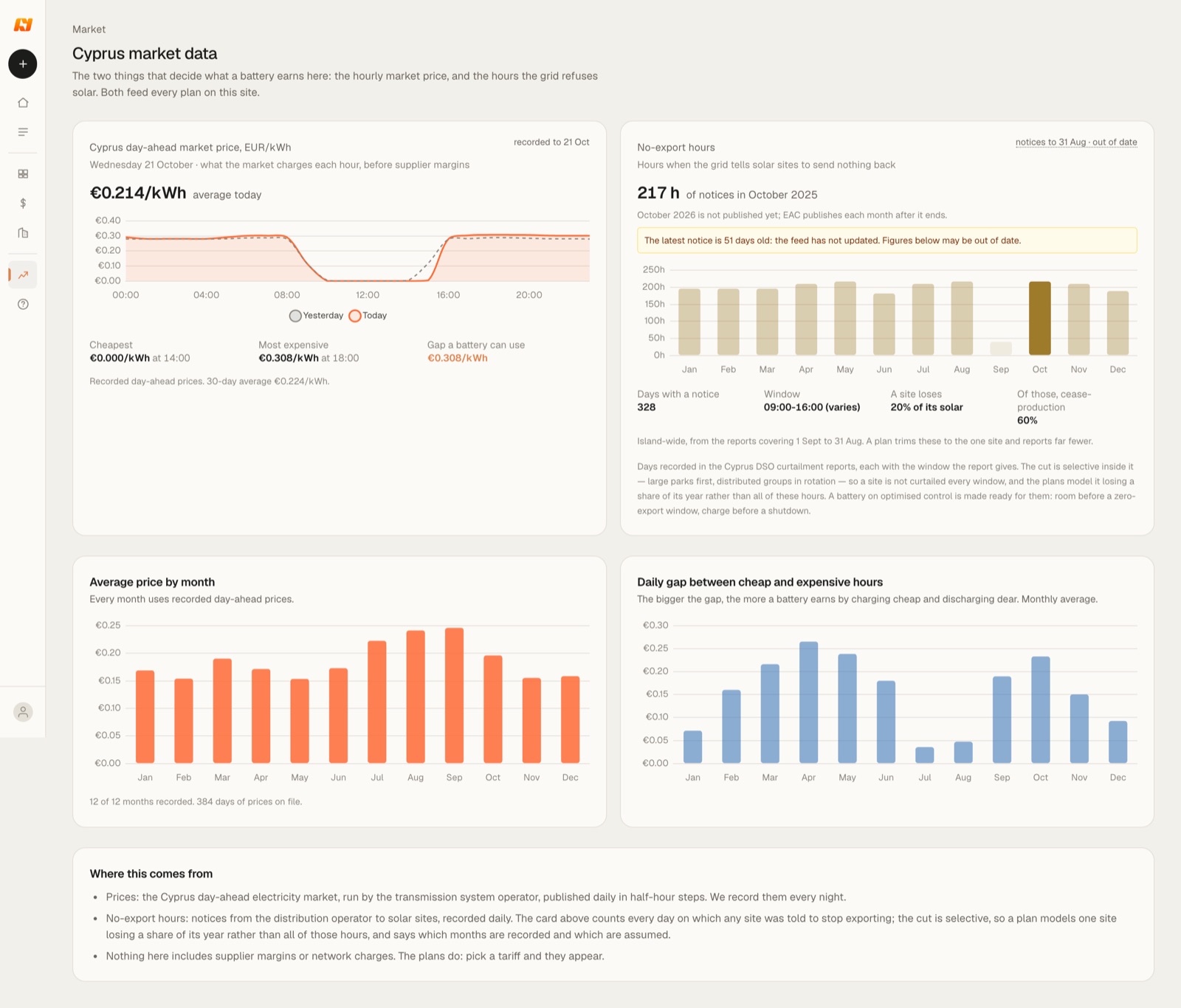
The two things that decide what a battery earns in Cyprus: the hourly day-ahead price and the hours the grid refuses solar. The page shows today's prices with the cheapest and dearest hour, no-export hours by month, the average price by month and the daily gap a battery can use.
Equipment and prices
Both pages need a sign-in. What you set here is where every new project starts; each project can still be changed on its own.
Equipment
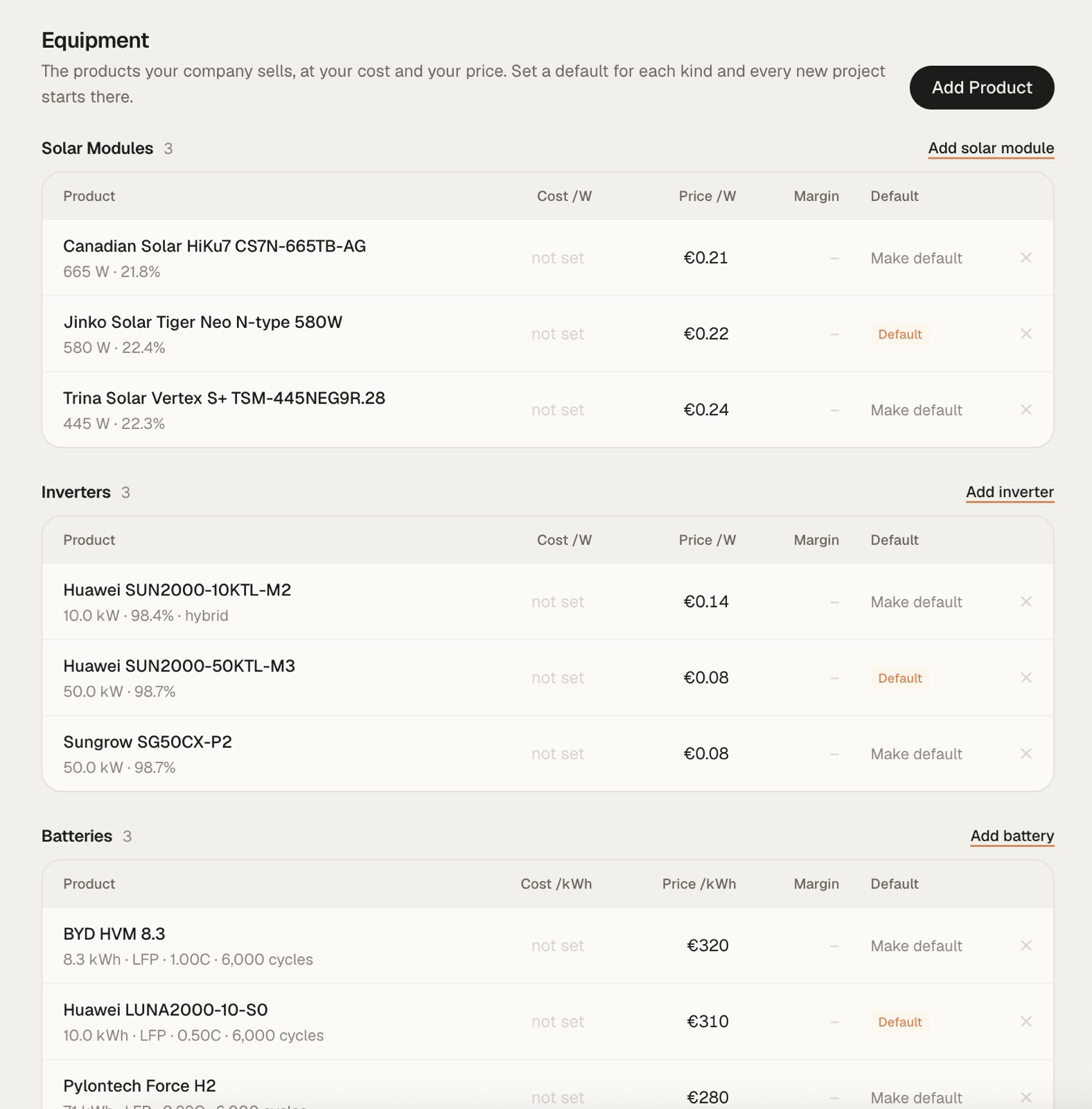
The products your company sells, at your cost and your price, in three lists: Solar Modules, Inverters and Batteries. Each row shows cost and price per W or per kWh, and the margin once both are set. Make default picks the product every new project starts with in each list. Add Product, or the add link above a list, puts a new one in.
Pricing Defaults
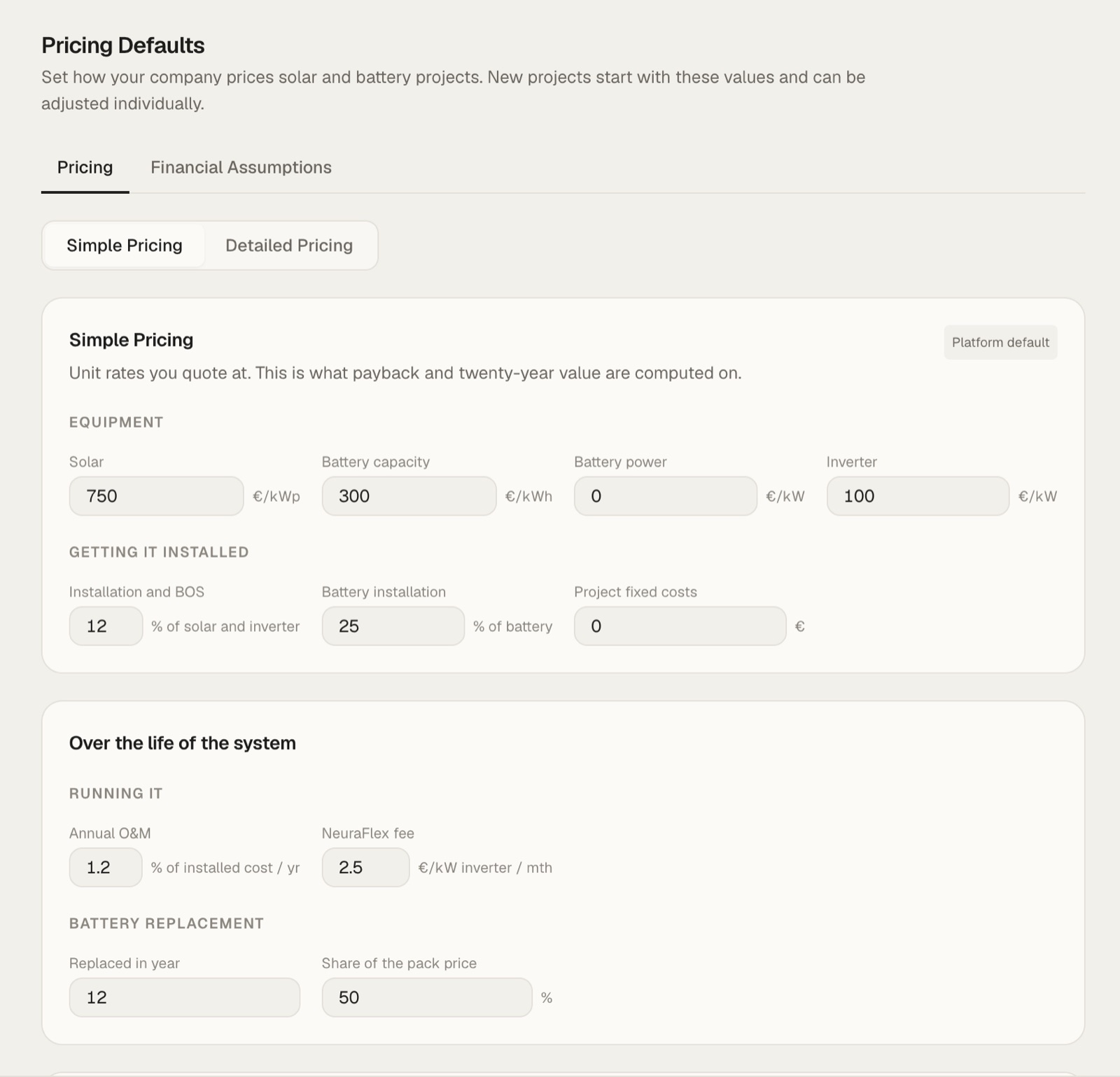
How your company prices solar and battery projects. Payback and 20-year value are computed on these rates. Two tabs:
- Pricing
- Simple Pricing uses unit rates: solar per kWp, battery capacity per kWh, battery power and inverter per kW, then installation as a share of the equipment and any fixed project cost. Detailed Pricing breaks the price down further. Below: annual O&M as a share of the installed cost, the NeuraFlex fee per kW of inverter a month, and the battery replacement year with its share of the pack price.
- Financial Assumptions
- The finance terms every new plan starts from: discount rate, price growth, lease rate and term.
How NeuraPlanner calculates a plan
One hourly model of the site over a calendar year, run once for each way of controlling the battery. The hardware is the same in both; what differs is the decision made every hour.
| Decision | Self-Consumption | NeuraFlex optimised |
|---|---|---|
| Charge from solar | Whenever solar exceeds the load, until full | When stored energy is worth more later than exporting now |
| Charge from the grid | Never | In cheap hours, when a later price covers the round trip |
| Discharge to the building | As soon as the load exceeds solar | In the hours when import is dearest |
| Discharge to the grid | Never | When the export credit beats holding the energy |
| No-export hours | Surplus solar is lost once the battery is full | Battery made ready: room before a zero-export window |
The optimised gain assumes perfect knowledge of prices and load, so only 85% of it is booked by default. Payback and 20-year value come from a yearly cashflow with price growth, panel ageing, upkeep and a half battery replacement in year twelve. All figures are in EUR, ex-VAT. The full method is under How it works in the app.
FAQ
Who is NeuraPlanner for?
Solar and battery installers in Cyprus who quote commercial sites: hotels, offices, shops, factories. You get a sized system, a payback and a proposal for your client from one electricity bill.
Will it stay free?
Yes. There is no licence and no per-project fee, now or later. Use it on every site you quote.
I'm not sure how to use it. Can someone walk me through it?
Yes. Write to us at info@neura.energy and we will set up a call and go through a project with you.
Can I export the results of a project?
Yes. Download the plan as a PDF or as an Excel file.
Can I send the plan to my client?
Yes, in whatever form suits you. Download the report as a PDF and send it as it is, or download it in Excel, adjust the figures and layout, and send it in your own format.
Do I need an account?
Not to look around: the example project opens without one. To create and save your own projects, sign in or create an account when you start the first one.
Which tariffs does it cover?
Every tariff a commercial site in Cyprus can sign: Bioland Flex 3, Plus 3 and Max 3, and EAC Codes 10, 30, 40 and 50. Rates are editable per project.
Is VAT included?
No. Every figure is in EUR, ex-VAT.